虚拟局域网
@VLAN- 内容 Contents
- 传统以太网的局限性
- 广播风暴
- 虚拟局域网的特点
- IEEE 802.1Q
- 常用的配置命令
- 实操
广播风暴
单交换配置VLAN
跨交换配置VLAN
- 传统以太网的局限性
- 资源的竞争
- 通信的私密性
- 广播风暴 Broadcast Storm
通信过程中,会产生大量广播帧
广播域 - 广播可以抵达的地方;这个区域越小越好
Broadcast Storm is a network condition in which so many broadcasts are occurring (for example, for apress verification purposes) that normal communication is disrupted.
continually sending out broadcast messages
the wire is continually busy
no other station is able to transmit information
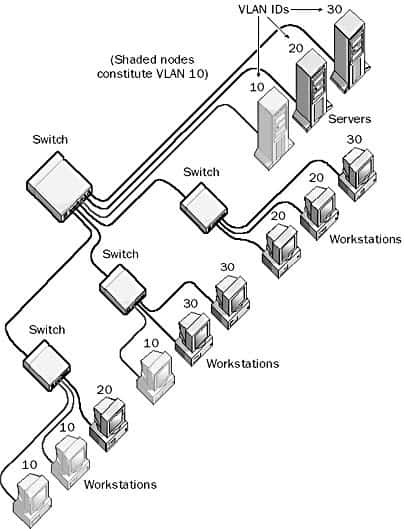

虚拟局域网 Virtual LAN
- 虚拟局域网VLAN - virtual LAN
- 不是一种新的局域网,而是一个服务/应用
- 通过配置,将一个物理的局域网在逻辑上划分为若干个虚拟的LAN
- VLAN内的主机间可以直接通信,而VLAN 间不能直接互通
- 每个VLAN帧都一个明确的标识 VLAN tag,表明帧属于哪个VLAN
- 特点 Feature
- 限制/隔离广播域: 广播域被限制在一个VLAN内,节省带宽,提高网络的处理能力
- 增强局域网的安全性:不同VLAN内的报文在传输时是相互隔离的不同的VLAN用户不能和其它VLAN用户直接通信
- 提高网络的健壮性:故障被限制在一个VLAN内,本VLAN内的故障不会影响其他VLAN的正常工作
- 灵活构建虚拟工作组:划分不同的用户到不同的工作组,网络构建和维护更方便灵活、更容易
- 使用 Usage
- VLAN由 id 和 name 来标识;默认情况下,所有端口都属于VLAN 1
根据 IEEE 802.1Q 标准,VLAN ID 是 12 位,因此理论上最多支持 2^12 = 4096 个 VLAN - 4K
其中 VLAN 0 和 VLAN 4095 被保留;VLAN 1 为默认 VLAN,所以实际可用的 VLAN ID 范围是 1-4094
- 一个交换机可以划分多个VLAN
- 每个VLAN不受网络物理位置的限制
- 通常利用交换机的端口划分VLAN
一个端口只能属于一个VLAN;所以一般称 port VLAN
- 一个VLAN可以包含多个端口
- 角色 Role
- 业务VLAN
- 互联VLAN
- 管理VLAN
- 端口模式 Mode
- access:
默认模式
一般用于链接用户计算机
access端口只能属于一个VLAN
- trunk:
用于交换机之间或交换机和路由器之间的链接
trunk端口可以属于多个VLAN
- hybrid:
混合模式
华为专有模式


二层交换机无法实现不同VLAN之间的通信
跨VLAN通信,需要三层设备
IEEE 802.1Q
- 简称dot one Q,加入4个字节的VLAN标记对以太网帧格式扩展,比普通以太网帧多4个字节
- 携带VLAN标记的帧长由1518 → 1522
- 2个字节的标签协议标识TPID - Tag Protocol Identifier:
固定为0x8100
- 2个字节的标签控制信息TCI - Tag Control Information,又包括:
Priority:VLAN优先级;3bit
CFI:格式;1bit
VLAN ID:VLAN号;12bit
- IEEE 802.1Q帧只在交换机内部识别并处理,用户主机并不能识别
- 处理过程
- 接收:每收到一个以太网帧,就打上标签:插入4个字节的VLAN标记,变成IEEE 802.1Q帧
- 转发:根据VLAN号转发到相应的端口,去掉标签后转发出去
- 单个交换机无法直接查看到802.1q的封帧情况
- Vlan帧的TCI字段的值 0x14表示什么
| Preamble | SFD | Destination MAC | Source MAC | Type | Data | FCS |
| 7 | 1 | 6 | 6 | 2 | 46-1500 | 4 |
| Preamble | SFD | Destination MAC | Source MAC | VLAN | Type | Data | FCS |
| 7 | 1 | 6 | 6 | 4 | 2 | 46-1500 | 4 |
| TPID | TCI | ||
| 2byte | 1bit | 3bit | 12bit |


实操 Drill
- 相关命令
- 更改端口模式
- vlan放行
- 查看所有trunk端口
- 查看指定trunk端口
- 广播风暴
- 搭建拓扑并分配IP地址
- 各主机互相通信情况(发送简单PDU或者ping)
- 发送广播报情况
- 单个交换机的VLAN的划分 点击下载PT文件
- 创建拓扑并分配IP
- 配置VLAN
创建vlan10
添加相应的端口 fa0/1 - 可以简写为f0/1
指定访问模式
- 查看VLAN配置结果 - 多了一个VLAN 10
- 配置其它VLAN并查看
- 测试通信情况:VLAN内部、VLAN之间
- 验证1:不同VLAN的用户不能通信
192.168.1.1 → 192.168.1.3:失败
C:\>ping 192.168.1.3 Pinging 192.168.1.3 with 32 bytes of data: Request timed out. Request timed out. Request timed out. Request timed out. Ping statistics for 192.168.1.3: Packets: Sent = 4, Received = 0, Lost = 4 (100% loss), C:\>192.168.1.1 → 192.168.1.5:失败
C:\>ping 192.168.1.5 Pinging 192.168.1.5 with 32 bytes of data: Request timed out. Request timed out. Request timed out. Request timed out. Ping statistics for 192.168.1.5: Packets: Sent = 4, Received = 0, Lost = 4 (100% loss), C:\> - 验证2:VLAN可以隔离广播域
模拟通信模式下,某个PC发送广播,查看各PC的通信情况
- 跨交换机的VLAN的划分 点击下载PT文件
- 搭建拓扑
- 配置各主机IP
- 创建vlan10,20,30
- 划分端口到相应的VLAN
- 设置交换机互联端口为trunk模式
- 查看对应端口模式
- 测试各VLAN的通信情况
- 查看交换机VLAN的配置情况
- 查看交换机trunk端口的详细信息
- 交换机某一侧已经设置为trunk模式的前提下,对端交换机可以不设置trunk - 系统会自动调整
- 且会让所有的vlan都通过
- 建议双方交换机都显式的设置为trunk并指定允许通过的vlan
- 可以指定端口的模式
Switch(config-if)#switchport mode trunk
Switch(config-if)#switchport trunk allowed vlan 20
Switch(config-if)#switchport trunk allowed vlan 20, 30
Switch(config-if)#switchport trunk allowed vlan 20-30
Switch#show interfaces trunk
Switch#show interfaces fa0/4 switchport


Switch>en
Switch#conf ter
Switch(config)#vlan 10
Switch(config-vlan)#inter f0/1
Switch(config-if)#switchport access vlan 10
Switch(config-if)#inter f0/2
Switch(config-if)#switchport access vlan 10
Switch(config-if)#end
Switch#show vlan

VLAN Name                             Status    Ports
---- -------------------------------- --------- -------------------------------
1    default                          active    Fa0/3, Fa0/4, Fa0/5, Fa0/6
                                                Fa0/7, Fa0/8, Fa0/9, Fa0/10
                                                Fa0/11, Fa0/12, Fa0/13, Fa0/14
                                                Fa0/15, Fa0/16, Fa0/17, Fa0/18
                                                Fa0/19, Fa0/20, Fa0/21, Fa0/22
                                                Fa0/23, Fa0/24, Gig0/1, Gig0/2
10   VLAN0010                         active    Fa0/1, Fa0/2
1002 fddi-default                     active
1003 token-ring-default               active
1004 fddinet-default                  active
1005 trnet-default                    active

VLAN Type  SAID       MTU   Parent RingNo BridgeNo Stp  BrdgMode Trans1 Trans2
---- ----- ---------- ----- ------ ------ -------- ---- -------- ------ ------
1    enet  100001     1500  -      -      -        -    -        0      0
10   enet  100010     1500  -      -      -        -    -        0      0
1002 fddi  101002     1500  -      -      -        -    -        0      0
1003 tr    101003     1500  -      -      -        -    -        0      0
1004 fdnet 101004     1500  -      -      -        ieee -        0      0


Switch#conf ter
Enter configuration commands, one per line.  End with CNTL/Z.
Switch(config)#inter fa0/4
Switch(config-if)#switchport mode trunk
Switch(config-if)#switchport trunk allowed vlan 20
Switch(config-if)#end
Switch#show interfaces trunk
Port        Mode         Encapsulation  Status        Native vlan
Fa0/4       on           802.1q         trunking      1

Port        Vlans allowed on trunk
Fa0/4       20

Port        Vlans allowed and active in management domain
Fa0/4       20

Port        Vlans in spanning tree forwarding state and not pruned
Fa0/4       20

Switch#
Switch#show interfaces tru
Switch#show interfaces trunk
Port        Mode         Encapsulation  Status        Native vlan
Fa0/4       auto         n-802.1q       trunking      1

Port        Vlans allowed on trunk
Fa0/4       1-1005

Port        Vlans allowed and active in management domain
Fa0/4       1,20,30

Port        Vlans in spanning tree forwarding state and not pruned
Fa0/4       1,20,30
Switch#show interfaces tru
Switch#show interfaces trunk
Port        Mode         Encapsulation  Status        Native vlan
Fa0/4       on           802.1q         trunking      1

Port        Vlans allowed on trunk
Fa0/4       20

Port        Vlans allowed and active in management domain
Fa0/4       20

Port        Vlans in spanning tree forwarding state and not pruned
Fa0/4       20
Switch#show interfaces fa0/4 switchport
Name: Fa0/4
Switchport: Enabled
Administrative Mode: trunk
Operational Mode: trunk
Administrative Trunking Encapsulation: dot1q
Operational Trunking Encapsulation: dot1q
Negotiation of Trunking: On
Access Mode VLAN: 1 (default)
Trunking Native Mode VLAN: 1 (default)
Voice VLAN: none
Administrative private-vlan host-association: none
Administrative private-vlan mapping: none
Administrative private-vlan trunk native VLAN: none
Administrative private-vlan trunk encapsulation: dot1q
Administrative private-vlan trunk normal VLANs: none
Administrative private-vlan trunk private VLANs: none
Operational private-vlan: none
Trunking VLANs Enabled: 20
Pruning VLANs Enabled: 2-1001
Capture Mode Disabled
Capture VLANs Allowed: ALL
Protected: false
Unknown unicast blocked: disabled
Unknown multicast blocked: disabled
Appliance trust: none
Summary & Homework
- Summary
- VLAN的特点
- VLAN的配置
单交换机
跨交换机
- Homework
- VLAN 是为了分割冲突域而设计的一种新的网络()。
- 可以跨交换机划分VLAN()。
- 翻译
Virtual LAN, or VLAN, is a networking technology that allows networks to be segmented logically without having to be physically rewired.
Each station can be assigned a VLAN identification number (ID), and stations with the same VLAN ID (no matter what physical switch they are connected to) can act and function as though they are all on the same physical network segment. Broadcasts sent by one host are received only by hosts with the same VLAN ID.
- 完善学校组织结构图的VLAN划分
自己指定VLAN号和对应的端口
测试不同VLAN之间的通信
测试广播域的通信
- 归纳总结交换机VLAN划分使用到的命令
- Reading